Mozilla Thunderbird is the second most widely used program for receiving and sending mail after Microsoft Outlook. So we decided to write a setup guide for this client as well.
In the main Thunderbird menu, choose Tools, Account Settings (Nástroje, Nastavení účtu).
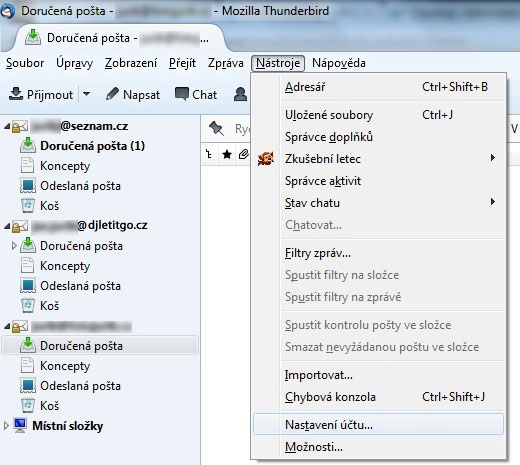
A window opens where, if you already have some mail accounts set up, you will see their list. At the bottom, click the Account Actions button (Akce účtu) and choose Add Mail Account (Přidat poštovní účet).
A dialog window appears where you enter the basic details of your account
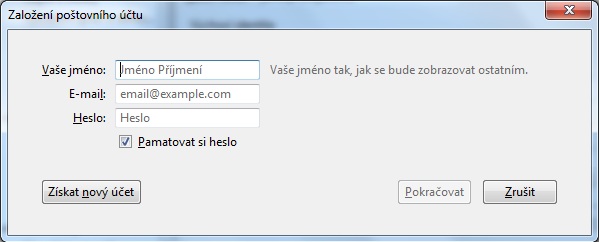
After entering the details, click the Continue button (pokračovat). In the next step, Thunderbird tries to find the configuration. Click Stop (zastavit) and fill in the following values:
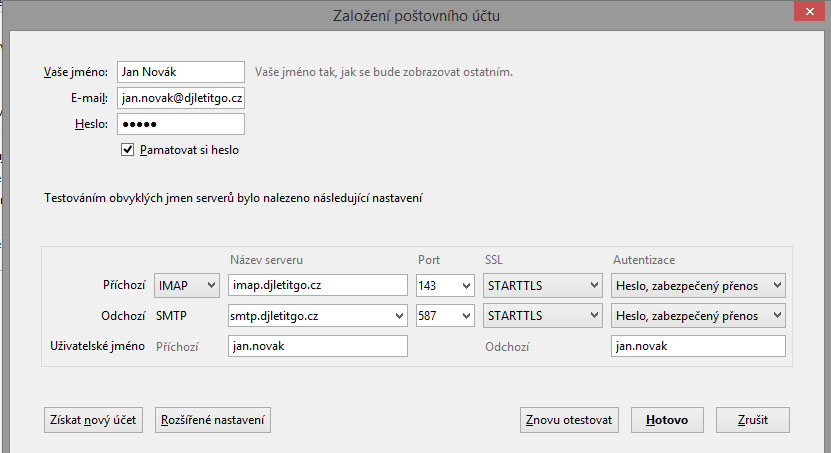
In the Username (Uživatelské jméno) field, enter the full email address.
Incoming email settings
To download mail, you can use either an IMAP or a POP3 server. We recommend using a secure connection (SSL/TLS or STARTTLS) for downloading.
As the authentication method (for POP/IMAP or SMTP), choose “Encrypted password”. The Kerberos and NTLM options CANNOT be used.
You can find the server addresses and ports on this page: Addresses for downloading and sending mail
The difference between the IMAP and POP3 protocols is described in the article Why use IMAP instead of POP3 to receive mail.
To turn off the spam folder, proceed as follows:
Log in to the webmail interface, open Tools - options (Nástroje - možnosti), the security tab - anti-spam (bezpečnost - anti-spam), and set the spam folder mode to “do not use the spam folder”.
Outgoing email settings
If you already have an outgoing SMTP server set up for other accounts, you can use it. Otherwise, set the following: Addresses for downloading and sending mail
After entering the details, click the Re-test (Znovu otestovat nastavení) button.
Check the entered details and click Create Account (Vytvořit účet).
After it is created, the account appears in the list of accounts, where you can set further details if needed.
When sending an email, your email client may not trust our certificates. In that case, you need to add the certificates of the certification authority we use to the trusted ones.
You can download them here: