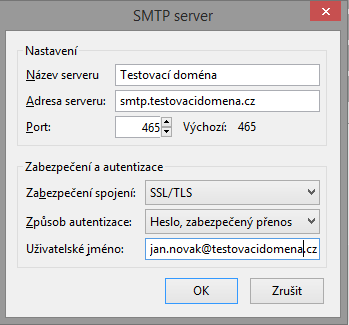
To send emails via the SMTP protocol, you need to set the SMTP server address in your email client, in the form smtp.testovacidomena.cz
You can find the specific SMTP server address for your web hosting in the service activation email or in the customer center (zákaznické centrum) in the detail of the specific web hosting
You must use authenticated login to the server. Choose one of the methods supported by your client (preferably an encrypted password; Kerberos / GSSAPI or NTLM CANNOT be used). For authentication, use the name and password of your mailbox (the same details as for POP3 or IMAP).
We also recommend setting up a secure connection using SSL/TLS or STARTTLS, so that communication between you and the server cannot be eavesdropped on.
Mozilla Thunderbird
Microsoft Outlook
- launch Microsoft Outlook 2007
- In the main menu, choose Tools - Account Settings (Nástroje - Nastavení účtu)
- In the newly opened window, select the email account whose settings you want to change and click the Change button (Změnit):
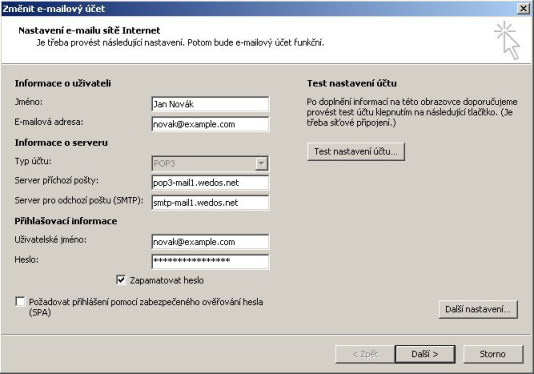
- You now see an overview of your account settings. Check that the following items are filled in correctly:
- Outgoing mail server (Server pro odchozí poštu): smtp.testovacidomena.cz
- User name (Uživatelské jméno): your email address including the domain name (e.g.: jan.novak@mujweb.cz)
- Password (Heslo): the password to your mailbox
- If everything is set correctly, click the More Settings (Další nastavení) button:
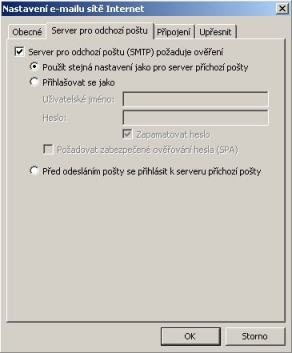
- A new window opens. Switch to the Outgoing Server tab (Server pro odchozí poštu) and set the following:
- tick My outgoing server (SMTP) requires authentication (Server pro odchozí poštu (SMTP) požaduje ověření)
- select Use same settings as my incoming mail server (Použít stejná nastavení jako pro server příchozí pošty)
- We also recommend setting encryption to SSL on the Advanced (Upřesnit) tab
- Confirm by pressing OK, finish editing the account with the Next (Další) button and then Finish (Dokončit)
Your email client may not trust our certificates. In that case, you need to add the certificates of the certification authority we use to the trusted ones.
You can download them here: