Before creating a new email account, you need to log in to the admin panel at https://hosting.spacehost.cz; https://hosting2.spacehost.cz; https://hosting3.spacehost.cz
A warning message caused by the certificate may pop up. In that case, go to the article SSL certificate, where we explain why this page appears.
The procedure for creating a new mailbox is as follows:
- After logging in to the admin panel, go to the Email (E-mail) tab.
- In the left menu, first select Email domains (E-mailové domény) and then click Add domain (Přidat doménu)
- In the Domain (Doména) field, enter the domain of your website, e.g. mujweb.cz (this is the part after the @ sign), and for Spam filter (Spamový filtr) choose Normal. Then tick the Active (Aktivní) checkbox and save everything
- Next, go to Email mailboxes (E-mailové schránky) in the left column and click Add mailbox (Přidat e-mailovou schránku) at the top
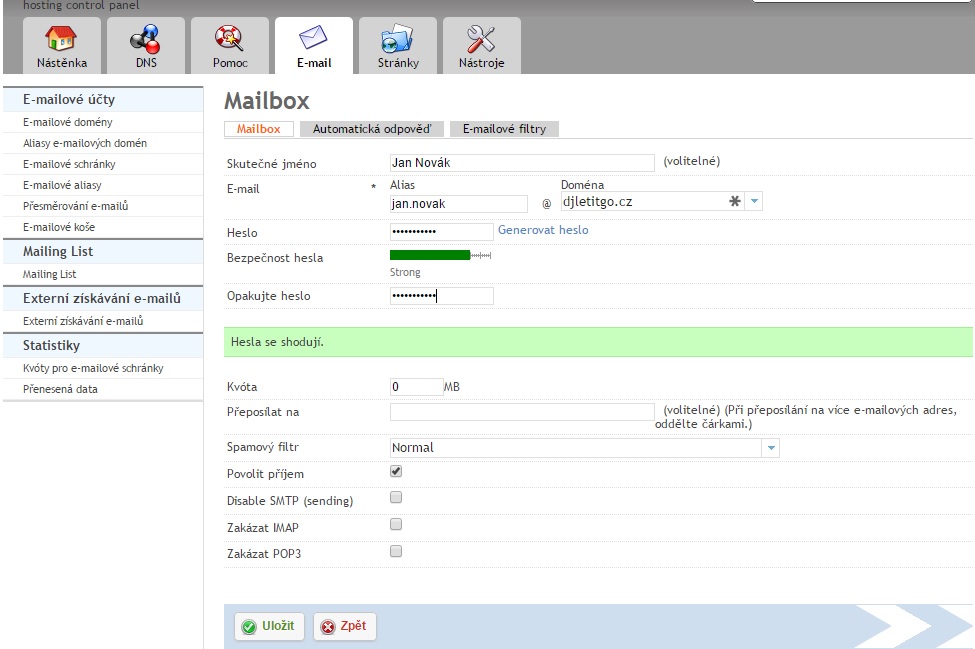
- In the window that opens, enter your Real name (Skutečné jméno) and, below it, a password. In the Alias field enter the name of the mailbox, e.g. jan.novak. In the Domain (Doména) field, select the domain you created in the second step of this guide.
- The Quota (Kvóta) field sets the default mailbox size. Since this is a system email, we recommend leaving the quota at 0 MB, which means an unlimited mailbox size.
- In the Spam filter (Spamový filtr) drop-down, choose Normal and tick the Allow receiving (Povolit příjem) checkbox
A correctly created email looks, for example, like this: