PHP is a programming language that most web applications run on, including WordPress, Joomla, Drupal and online store systems. Each website (and each subdomain) on our hosting can run on a different PHP version. You switch the version yourself in the admin panel, without waiting and without having to ask us to move anything.
Which versions we offer
| Version | Security support until | Note |
| 8.2 | December 2026 | For older applications that cannot yet handle a newer version. Consider upgrading soon. |
| 8.3 | December 2027 | A stable choice for most websites. |
| 8.4 | December 2028 | The default version. Recommended for new websites. |
| 8.5 | December 2029 | The newest version. Suitable for applications that officially support it. |
Support dates are set by the PHP project; the current overview is at php.net/supported-versions.php. For security reasons we do not offer older versions (PHP 5 and 7), so very old code needs to be updated. The procedure is in the article Moving to a newer PHP version.
How to change the version
In the admin panel at hosting.spacehost.cz (or hosting2 or hosting3, depending on where your hosting runs), go to Sites (Stránky), in the left column choose Websites (Webové stránky), select your website and then find the PHP version (PHP verze) option. Choose the version you want and save.
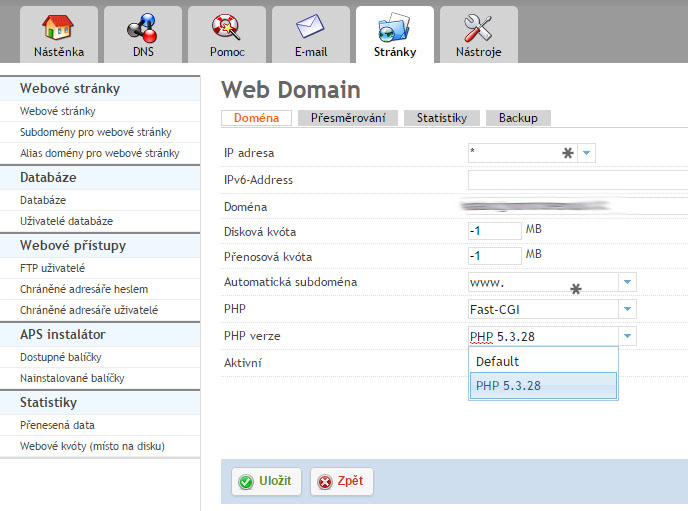
The image is from an older look of the admin panel. The list of versions is different today, but the location of the option is the same.
Each website can have a different version
You set up a subdomain as a separate website, so it can run on a different PHP version than the main domain. You can use this for safe testing: you try a new website or a new version on a subdomain first. More in the article Creating a subdomain.
Which version to choose
- A new website or a regularly updated application: keep the default version, or choose a newer one.
- An older application that does not work with the new version: temporarily choose an older version and update the application. An older version is a temporary solution, not a permanent one.
- You will find information about supported versions in the documentation of your application (WordPress, online store). The same goes for the documentation of plugins and themes.
What to do if there is a problem after switching
- Go back to the previous version. The website returns to its original state.
- Find the cause using PHP errors and debugging.
- Update the application and its add-ons, then switch again.