What is a mailing list?
It is a special mailbox that automatically forwards every email it receives to selected subscribers.
When you create a mailing list, you create a special mailbox, and an email sent to this mailbox is distributed to all the subscribers (members) you have entered for the mailing list.
To give you an idea, here is an example:
You are a manager at a company and need to send an email only to employees in the transport department.
Your mailing list contains these emails:
doprava@yourdomain.cz (15 employees - this address forwards to the 15 emails of all employees)
prijemzbozi@yourdomain.cz (8 employees)
sklad@yourdomain.cz (10 employees)
vsechny@yourdomain.cz (all employees)
So you send an email only to doprava@yourdomain.cz and it is forwarded to all the addresses associated with transport. Since it would be needlessly complicated and time-consuming to type 15 addresses every time, it is better to send an email to the transport address and everything is forwarded automatically, which also makes sure nobody is forgotten.
If you, as a manager, want to send an email to all employees, simply send an email to vsechny@yourdomain.cz. The list of email addresses behind the address for everyone in the company can then contain either all employees' email addresses, or only the addresses of the individual departments.
How do I create a mailing list?
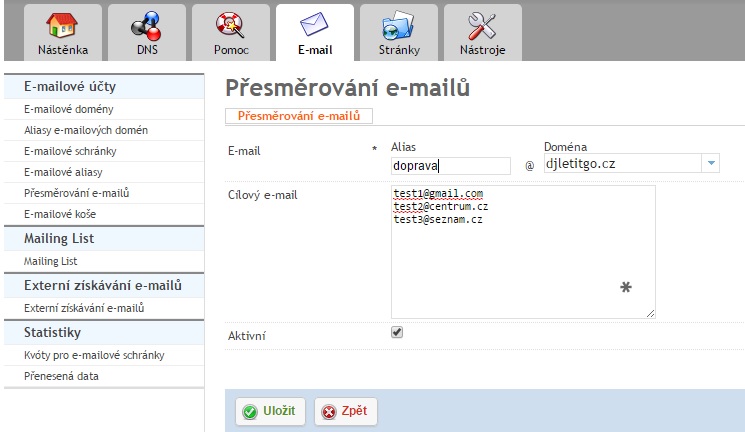
The simplest way to forward emails to the right addresses through the admin panel is to click the Email (E-mail) tab and then click Email forwarding (Přesměrování emailů) in the left menu.
Then click Add new redirect (Přidat nové přesměrování).
In the top field, enter the email address that, when new mail arrives, will be automatically redirected to the other addresses (do not create a new mailbox).
See a correctly set up mailing list below: