A guide for situations where file uploads to your website do not work on your web hosting.
Common causes of upload failures:
- a missing tmp directory on your FTP - this directory is created when the website is created and you have probably deleted it. Just create it again (in the root directory of the main FTP account, next to the web and ssl directories, etc.). See the web hosting directory structure
- uploaded files that are too large - the web hosting has a limit for the maximum size of an uploaded file, and files that are too large cannot be uploaded. Large files need to be uploaded via FTP
- an upload that is too slow - PHP scripts have a time limit for processing, and if they exceed the set time, the script is terminated and the upload is interrupted
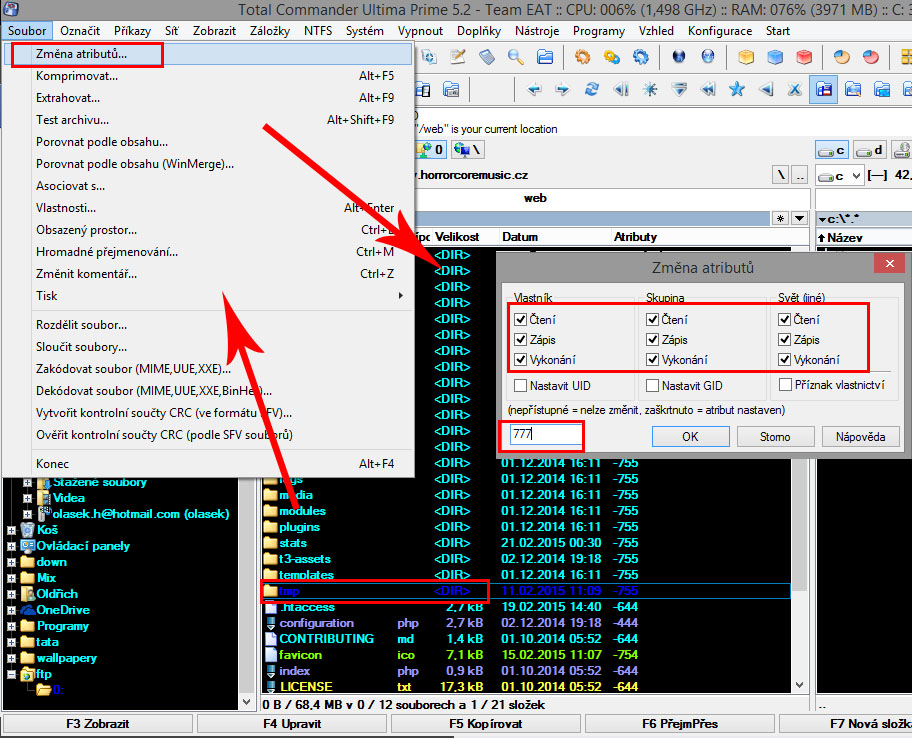
- wrong attribute settings - the folder you are uploading to must have write attributes set, the so-called CHMOD 777. You can change folder attributes with Total Commander
Example of changing attributes of a website folder on FTP: